> ## Documentation Index
> Fetch the complete documentation index at: https://docs.weeziq.com/docs/llms.txt
> Use this file to discover all available pages before exploring further.
# Conversations
> Review every chat session in real time, capture visitor information through smart forms, and manage your entire lead pipeline.
Every time a visitor uses your chatbot, a detailed record is created. The Conversations and Leads pages give you full visibility into what users are asking and the contact information they provide.
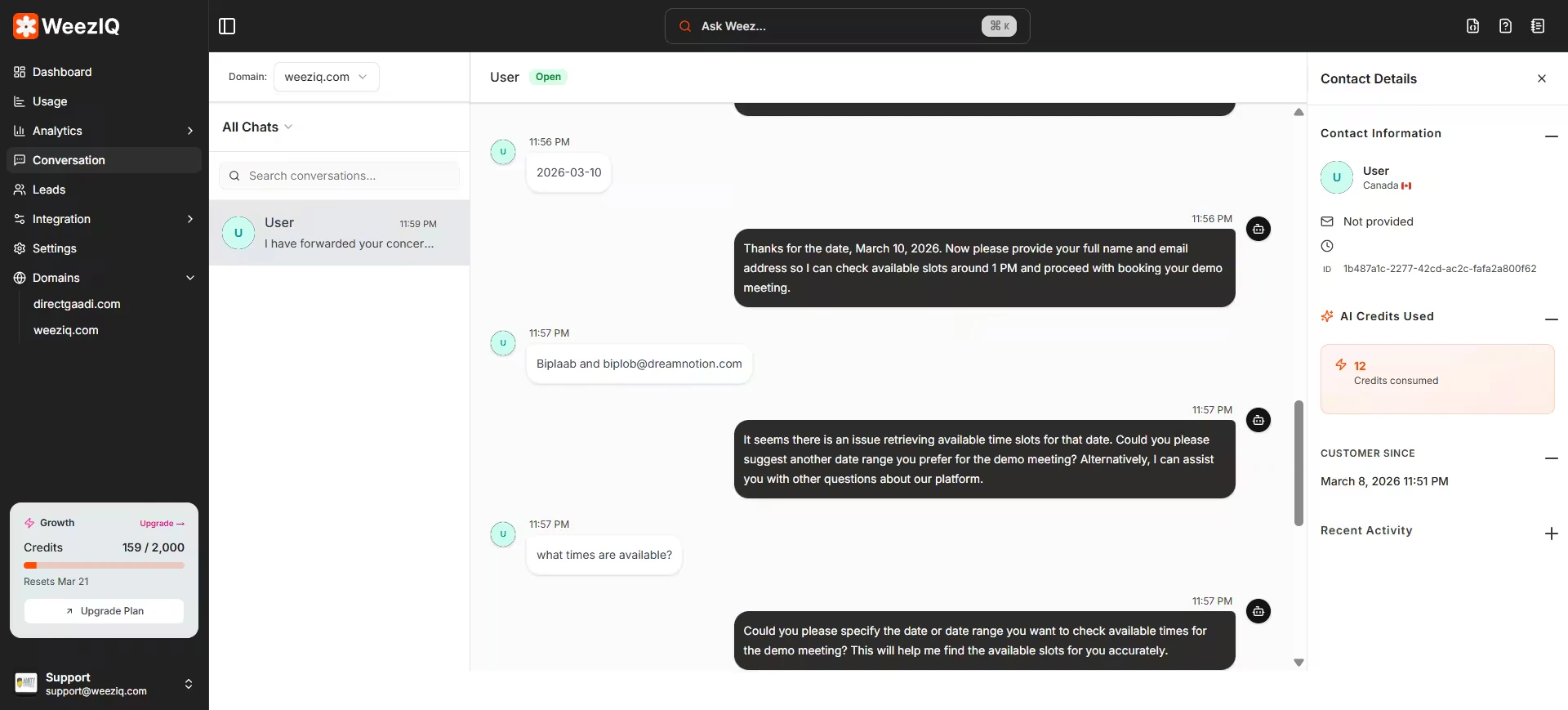 Click **Conversation** in the sidebar to access the full chat history.
### Layout
The Conversations page uses a **split-pane layout**:
* **Left Panel:** A scrollable list of all chat sessions, organized by domain. Each entry shows the visitor's name (if captured), the last message, and the timestamp.
* **Right Panel:** The full transcript of the selected conversation, showing both user messages and AI responses with timestamps.
### Filtering and Search
View conversations for a specific website using the domain selector.
Filter by All, Unread, or Expired conversations.
Search through conversations to find specific topics or messages.
### Real-Time Updates
Conversations update in real time using WebSocket connections. If a visitor is actively chatting while you have the Conversations page open, you will see new messages appear instantly without refreshing.
### Message Feedback
Each AI response displays a feedback indicator. Visitors can mark responses as helpful (thumbs up) or unhelpful (thumbs down). This data feeds directly into the Analytics confidence and satisfaction metrics.
***
Click **Conversation** in the sidebar to access the full chat history.
### Layout
The Conversations page uses a **split-pane layout**:
* **Left Panel:** A scrollable list of all chat sessions, organized by domain. Each entry shows the visitor's name (if captured), the last message, and the timestamp.
* **Right Panel:** The full transcript of the selected conversation, showing both user messages and AI responses with timestamps.
### Filtering and Search
View conversations for a specific website using the domain selector.
Filter by All, Unread, or Expired conversations.
Search through conversations to find specific topics or messages.
### Real-Time Updates
Conversations update in real time using WebSocket connections. If a visitor is actively chatting while you have the Conversations page open, you will see new messages appear instantly without refreshing.
### Message Feedback
Each AI response displays a feedback indicator. Visitors can mark responses as helpful (thumbs up) or unhelpful (thumbs down). This data feeds directly into the Analytics confidence and satisfaction metrics.
***