> ## Documentation Index
> Fetch the complete documentation index at: https://docs.weeziq.com/docs/llms.txt
> Use this file to discover all available pages before exploring further.
# Data Sources
> Train your AI chatbot using website URLs, document uploads, e-commerce product data, and manually curated Q&A pairs.
Your WeezIQ chatbot is only as helpful as the information you give it. The Data Sources (also referred to as the Knowledge Base) is where you provide all the content the AI will use when answering customer questions.
## How the Knowledge Base Works
 Text is extracted from the source (whether it's a web page, uploaded document, or synced product).
The extracted text is broken into smaller pieces (chunks) so the AI can search through them efficiently.
Each chunk is converted into a mathematical representation (a vector embedding) that allows the AI to find the most relevant content for any given question.
Everything is stored securely, with the original content backed up on cloud storage for reliability.
When a visitor asks your chatbot a question, the AI searches through these embeddings to find the most relevant chunks and uses them to craft an accurate, contextual answer. This is called **Retrieval Augmented Generation (RAG)**.
## Data Source Types
The fastest way to train your chatbot is to point it at your existing website.
1. Navigate to the Knowledge Base section for your domain.
2. Paste one or more URLs (for example, your FAQ page, About Us page, or blog posts).
3. Click to start crawling.
WeezIQ will visit each URL, extract the readable text content using a built-in readability parser, and store it in the Knowledge Base. You can review the extracted content before finalizing.
**Sitemap Support:** If your site has a sitemap, WeezIQ's sitemap parser can discover and crawl multiple pages automatically.
**Auto Recrawling:** For content that changes frequently, the platform supports scheduled recrawling to keep your Knowledge Base current.
For internal documents that are not publicly accessible on the web:
1. Navigate to the Knowledge Base section.
2. Click **Upload** and select your file.
3. Supported formats include **PDF**, **DOCX** (Word), and **TXT** (plain text).
Each file is uploaded to secure cloud storage, then the text is extracted, chunked, and embedded. You can view the file's processing status (Pending, Processing, Completed, Failed) directly in the dashboard.
There are file size and character limits based on your subscription plan. The platform will notify you if you exceed them.
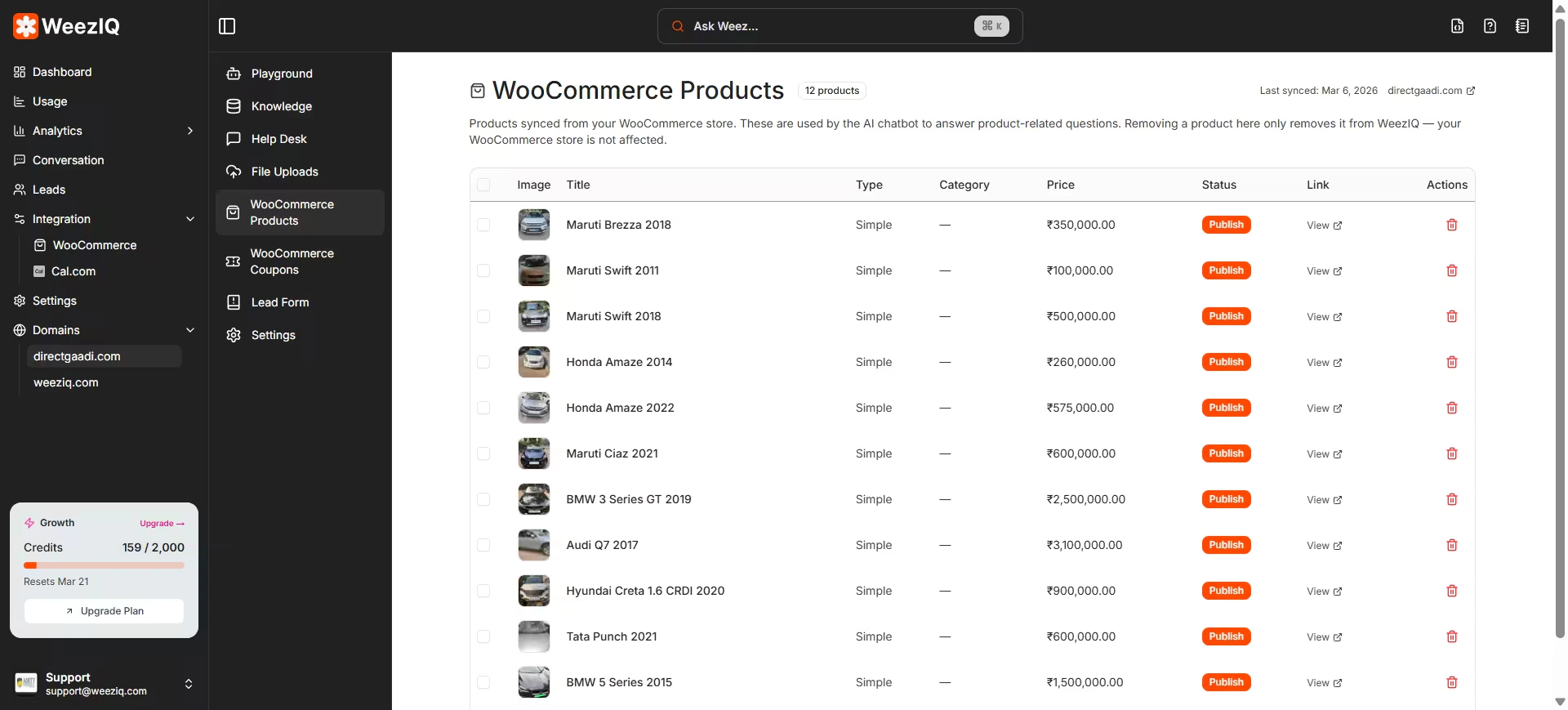
If you have connected a Shopify or WooCommerce store, your product catalog is automatically available as a data source.
**What gets synced:**
* Product titles and descriptions
* Variant details (sizes, colors, etc.)
* Price ranges and images
* Tags and categories
* Product status (active, draft, etc.)
* Customer reviews (WooCommerce)
The synced product data is chunked and embedded just like any other knowledge source, allowing the chatbot to answer product-specific questions, make recommendations, and display interactive product cards.
You can manually define specific question-and-answer pairs. These are particularly useful for:
* Frequently asked questions with precise answers
* Override responses for questions the AI might otherwise answer incorrectly
* Critical information that must be conveyed word-for-word (like refund policies)
Each Q\&A pair is embedded as a vector, giving it high priority when the AI searches for relevant context.
## Best Practices
**Be specific with your URLs.** A targeted FAQ page will give the AI much better answers than a generic homepage.
**Keep documents clean.** Conflicting or outdated information will confuse the AI. Review and update your sources regularly.
**Test after adding data.** After uploading new content, test the chatbot by asking questions related to that content. If the answers are not accurate, verify that the content was successfully processed.
**Use Q\&A pairs for critical answers.** If there is a question that must always be answered the same way, add it as a Help Desk entry rather than relying on the AI to extract it from a longer document.
Text is extracted from the source (whether it's a web page, uploaded document, or synced product).
The extracted text is broken into smaller pieces (chunks) so the AI can search through them efficiently.
Each chunk is converted into a mathematical representation (a vector embedding) that allows the AI to find the most relevant content for any given question.
Everything is stored securely, with the original content backed up on cloud storage for reliability.
When a visitor asks your chatbot a question, the AI searches through these embeddings to find the most relevant chunks and uses them to craft an accurate, contextual answer. This is called **Retrieval Augmented Generation (RAG)**.
## Data Source Types
The fastest way to train your chatbot is to point it at your existing website.
1. Navigate to the Knowledge Base section for your domain.
2. Paste one or more URLs (for example, your FAQ page, About Us page, or blog posts).
3. Click to start crawling.
WeezIQ will visit each URL, extract the readable text content using a built-in readability parser, and store it in the Knowledge Base. You can review the extracted content before finalizing.
**Sitemap Support:** If your site has a sitemap, WeezIQ's sitemap parser can discover and crawl multiple pages automatically.
**Auto Recrawling:** For content that changes frequently, the platform supports scheduled recrawling to keep your Knowledge Base current.
For internal documents that are not publicly accessible on the web:
1. Navigate to the Knowledge Base section.
2. Click **Upload** and select your file.
3. Supported formats include **PDF**, **DOCX** (Word), and **TXT** (plain text).
Each file is uploaded to secure cloud storage, then the text is extracted, chunked, and embedded. You can view the file's processing status (Pending, Processing, Completed, Failed) directly in the dashboard.
There are file size and character limits based on your subscription plan. The platform will notify you if you exceed them.
If you have connected a Shopify or WooCommerce store, your product catalog is automatically available as a data source.
**What gets synced:**
* Product titles and descriptions
* Variant details (sizes, colors, etc.)
* Price ranges and images
* Tags and categories
* Product status (active, draft, etc.)
* Customer reviews (WooCommerce)
The synced product data is chunked and embedded just like any other knowledge source, allowing the chatbot to answer product-specific questions, make recommendations, and display interactive product cards.
You can manually define specific question-and-answer pairs. These are particularly useful for:
* Frequently asked questions with precise answers
* Override responses for questions the AI might otherwise answer incorrectly
* Critical information that must be conveyed word-for-word (like refund policies)
Each Q\&A pair is embedded as a vector, giving it high priority when the AI searches for relevant context.
## Best Practices
**Be specific with your URLs.** A targeted FAQ page will give the AI much better answers than a generic homepage.
**Keep documents clean.** Conflicting or outdated information will confuse the AI. Review and update your sources regularly.
**Test after adding data.** After uploading new content, test the chatbot by asking questions related to that content. If the answers are not accurate, verify that the content was successfully processed.
**Use Q\&A pairs for critical answers.** If there is a question that must always be answered the same way, add it as a Help Desk entry rather than relying on the AI to extract it from a longer document.